.png?width=138&height=28&name=Wordmark%20(2).png)
On this page
- How data connection works with TWAICE
- Connection options at a glance
- Which option is right for you?
- The four connection methods
- Option 1: Unified Data Foundation
- How it works
- Good to know
- Option 2: TWAICE Ingestion API
- How it works
- Good to know
- Option 3: SFTP Upload
- How it works
- Good to know
- Option 4: TWAICE Pull Stack
- How it works
- Good to know
- What is the latency of my data?
- Security
- Historical data
- Next steps
TWAICE's analytics run on your battery system's operating data: voltage, current, temperature, State of Charge (SoC), and related telemetry. A data connection is the transport mechanism that gets this data from your infrastructure into the TWAICE Cloud.
This article explains available data connection methods, how they work, and how to choose the one that best fits your setup.
How data connection works with TWAICE
There are four supported connection methods. They differ in where your data is stored today and how it reaches TWAICE. Regardless of the connection method you choose, the analytics and insights available in the platform remain the same.
If needed, your TWAICE contact can help you select a method before onboarding.
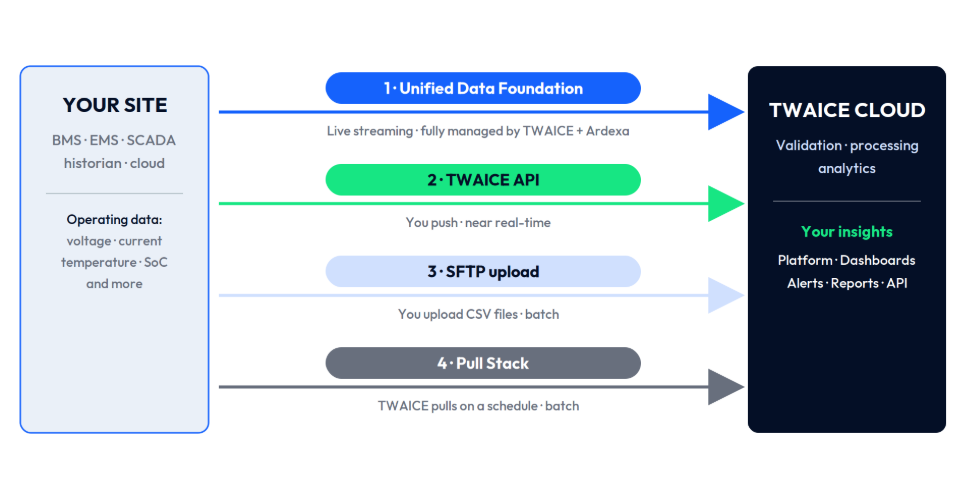
Connection options at a glance
| 1 · Unified Data Foundation | 2 · TWAICE Ingestion API | 3 · SFTP upload | 4 · Pull Stack | |
| Who moves the data | TWAICE and our data partner collect and stream your data | Your system pushes data via REST API | Your system uploads CSV files | TWAICE retrieves data from your system |
| Your initial effort | Minimal | One-time API integration, confirm tag list | Configure recurring CSV exports, confirm tag list | Provide authentication and endpoint documentation |
| Data freshness | Near real-time | Near real-time, based on your set up | Based on your upload schedule | Scheduled data retrieval |
| Best suited when | Your data isn't available in the cloud yet | You have a cloud platform and development resources | You prefer a simple file-based integration | Your system can be queried but cannot push data |
| TWAICE Onboarding Speed | Fast | Fast | Fast | Slowest, custom development from TWAICE required |
| Customer Maintenance | Low, managed by TWAICE and partner | Maintenance on the customer side | Maintenance on the customer side | Low, maintenance on the TWAICE side |
| Cost | $$$ · requires managed add-ons incl. hardware & operation | $ · no additional service fee | $ · no additional service fee | $$ · requires TWAICE setup & operation; details scoped in your proposal |
All connection methods encrypt data during transmission and can be combined. For example, you can stream live operational data while uploading historical data separately via CSV.
Cost indications are relative. Your TWAICE proposal includes the pricing for your specific setup.
Which option is right for you?
The optimal option depends on where your data is today and how it can be accessed.
-
If your data remains on site and no cloud infrastructure exists yet, TWAICE's Unified Data Foundation provides a fully managed acquisition solution.
-
If your data is already available in your own cloud platform, the TWAICE Ingestion API is often the preferred choice.
-
If your system can periodically export CSV or .gzip files, SFTP offers a simple integration.
-
If your data is stored in a database or exposed through an API that cannot actively push data, Pull Stack retrieves it on a schedule.
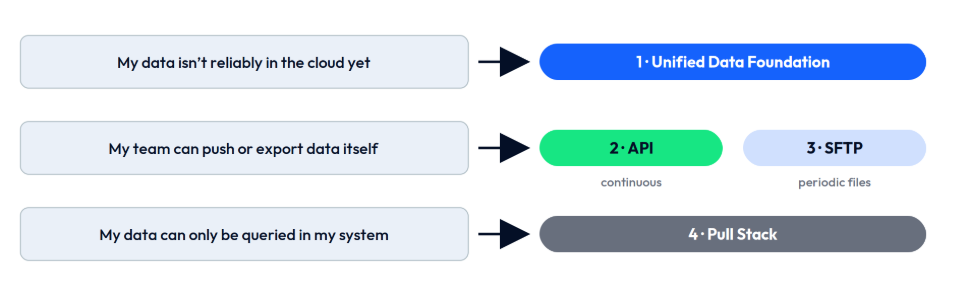
👉🏻 Live dashboards and alerting benefit from continuous data streams (Unified Data Foundation or API Ingestion), while health analytics, degradation tracking, and warranty management work equally well with scheduled batch uploads.
You can change or add connection methods later as your infrastructure evolves.
The four connection methods
Option 1: Unified Data Foundation
The Unified Data Foundation is a fully managed data acquisition service delivered by TWAICE and our data acquisition partner. It is designed for customers whose battery system data is not yet reliably available in the cloud, or who prefer not to build and operate their own data pipeline.
How it works
-
Data is collected directly from your site.
-
The data is standardized within the partner's cloud platform.
-
A secure WebSocket streams the data continuously to TWAICE.
-
Analytics, dashboards, and alerts on TWAICE platform update automatically with continuous data flow.
Good to know
-
Hardware, connectivity, and setup are included.
-
SCADA / EMS integration is handled for you (e.g., communication via industrial protocols such as Modbus, OPC-UA, DNP3, etc.).
-
Local buffering protects against temporary connectivity interruptions.
-
The same data infrastructure can also feed your own applications, such as EMS platforms or data lakes.
-
Additional systems such as PV, transformers, or auxiliary equipment can be connected using the same infrastructure.
📖 Learn more: Unified Data Foundation
Option 2: TWAICE Ingestion API
Your team pushes data directly to the TWAICE REST API. You maintain full control over what is sent and when, with data visible in the platform as soon as you push it.
How it works
-
TWAICE works with you to identify which sensor tags should be pushed.
-
Your team builds a one-time integration.
-
Whenever sensor data is pushed to TWAICE's Ingestion API endpoint, data becomes available in TWAICE platform near-real time after processing.
-
After testing in the sandbox environment, the integration is activated in production.
-
Analytics, dashboards, and alerts on TWAICE platform update automatically with continuous data flow.
Good to know
-
Data becomes available in TWAICE shortly after it is sent.
-
TWAICE provides Ingestion API documentation, a Python SDK, and a sandbox environment.
-
Your engineering team remains in full control of the integration.
📖 Learn more: Ingestion API User Guide
Option 3: SFTP Upload
Export data as CSV files and upload them to the TWAICE SFTP server on a schedule of your choosing.
How it works
-
TWAICE works with you to identify which sensor tags should be pushed.
-
TWAICE provides secure SFTP credentials.
-
Your system exports CSV files on your preferred schedule.
-
You can upload your data using standard SFTP clients (like FileZilla) or programmatically via scripting tools (such as Python, Bash, or PowerShell).
-
New data becomes available in the platform after each upload.
Good to know
-
CSV files must follow a file format consisting of timestamp, metric, and value.
-
CSV files must be formatted as long tables. Wide-format tables are not accepted.
-
Historical datasets are commonly imported using this method.
📖 Learn more: Ingestion via TWAICE SFTP Server
Option 4: TWAICE Pull Stack
Use Pull Stack when your data sits in a database or behind an API that can't actively send data to TWAICE.
How it works
-
You provide read-only access to your data source.
-
TWAICE configures a dedicated pull client.
-
Data is retrieved automatically according to an agreed schedule.
-
Missed data is automatically backfilled after interruptions.
Good to know
-
Access is strictly read-only.
-
Static TWAICE IP addresses are available for firewall whitelisting.
-
Site-to-site VPN connections are supported if required.
📖 Learn more: Pull Stack Configuration and the Pull Stack Connection Questionnaire
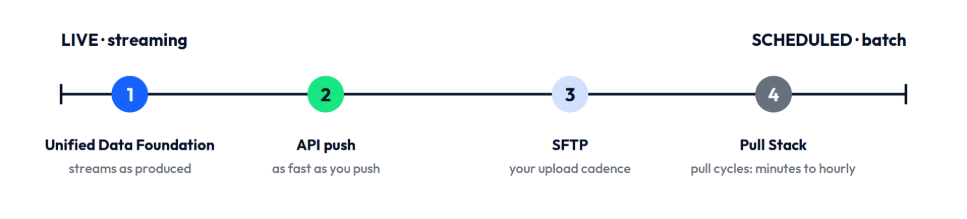
What is the latency of my data?
This is the most common question about data connections.
For analytical use cases, the difference rarely matters: degradation trends and warranty KPIs are computed and evaluated on regular analysis cycles and are equally accurate on any connection type.
Continuous streaming (Unified Data Foundation or Ingestion API) becomes valuable for live operational use cases, such as live dashboards and near real-time alerting.
Security
-
All connection methods use encrypted, authenticated, and access-controlled communication.
-
TWAICE is certified according to ISO/IEC 27001:2022 (audited by TÜV SÜD).
-
Additional security requirements, such as data residency or dedicated network configurations, can be discussed during onboarding.
Historical data
-
If historical battery system data is available (for example from commissioning, factory acceptance testing, or another monitoring platform), it can be imported independently of your live connection.
-
Historical imports are typically provided as CSV or GZIP files via SFTP.
Next steps
Your TWAICE contact will help you choose and configure the most suitable connection method during onboarding.
If your preferred data connection method isn't listed here, contact us to discuss your requirements.
👉🏻 Contact us at support@twaice.com.